For food businesses
Take food orders on WhatsApp without losing one in the chat
SiniSlot gives a Malaysian food business one WhatsApp link where customers pick from the menu, choose pickup or delivery and a time, and pay with FPX online banking or at pickup. It counts your daily stock, stops orders when the kitchen is full, shows the delivery fee before payment, and pays online payments into your bank account. Customers install no app.
Built for Malaysian home kitchens and cafés · FPX or pay at pickup · Customers need no new app
By Zukmi Hazamer, founder of SiniSlot Booking · Last reviewed 2026-10-08
What taking orders by chat costs a kitchen
Most home food sellers start with WhatsApp messages and a notebook. That works until the orders pile up.
- Orders arrive while you are cooking, so replies are late and the customer buys elsewhere.
- You sell 40 packs of nasi lemak when you only cooked 30, then message ten people to cancel.
- Payment screenshots have to be matched to orders by hand, and some never arrive.
- Pickup times clash, and five customers turn up at 12:30 pm at once.
- The delivery fee is worked out by hand for every address, and sometimes it is wrong.
Work out what a missed order costs you
Put a number on the orders lost to late replies and oversold stock. Fill in your own figures.
| Average order | RM30 |
|---|---|
| Orders missed or cancelled per week | 6 |
| Lost sales per week | RM180 |
| Lost sales per month | RM720 |
| Paid before you start cooking | RM30 per order |
This is a worked example with sample figures.
How an order runs
One journey, from the customer’s first tap to an order on your kitchen list.
- 01
The customer taps your link
From WhatsApp, your Instagram bio or a QR code at the stall. No app to install, no account to create.
- 02
They fill a cart
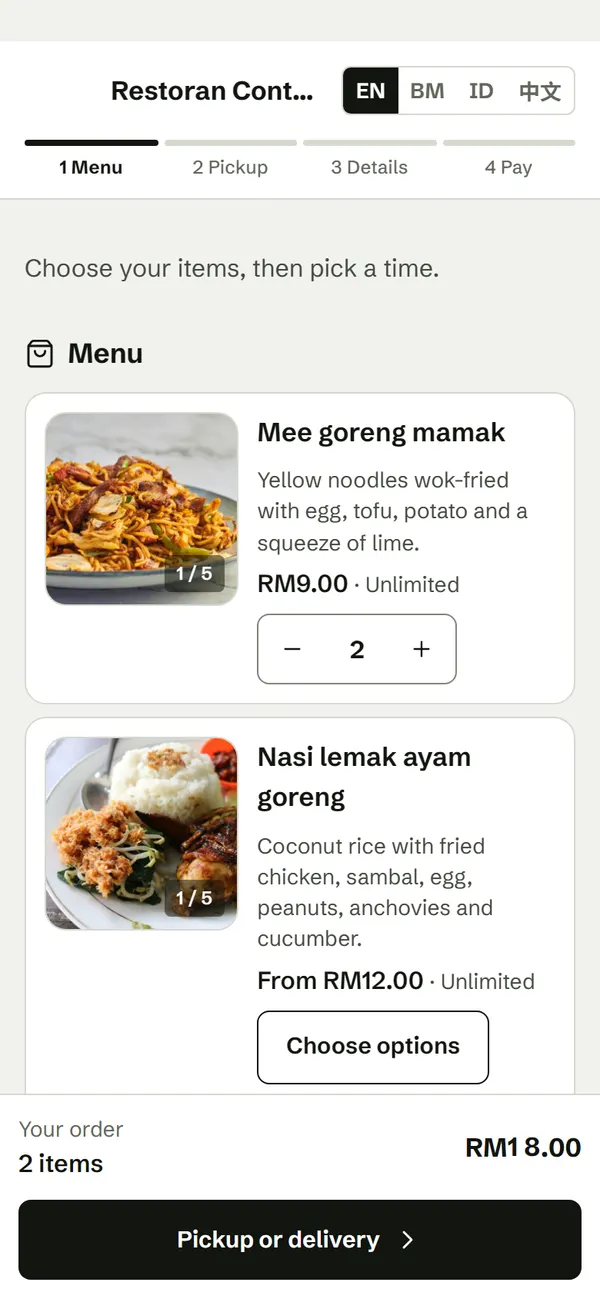
Your menu with real prices, photos and choices such as spicy or not, hot or iced. Sold-out items cannot be added.
- 03
They choose pickup or delivery
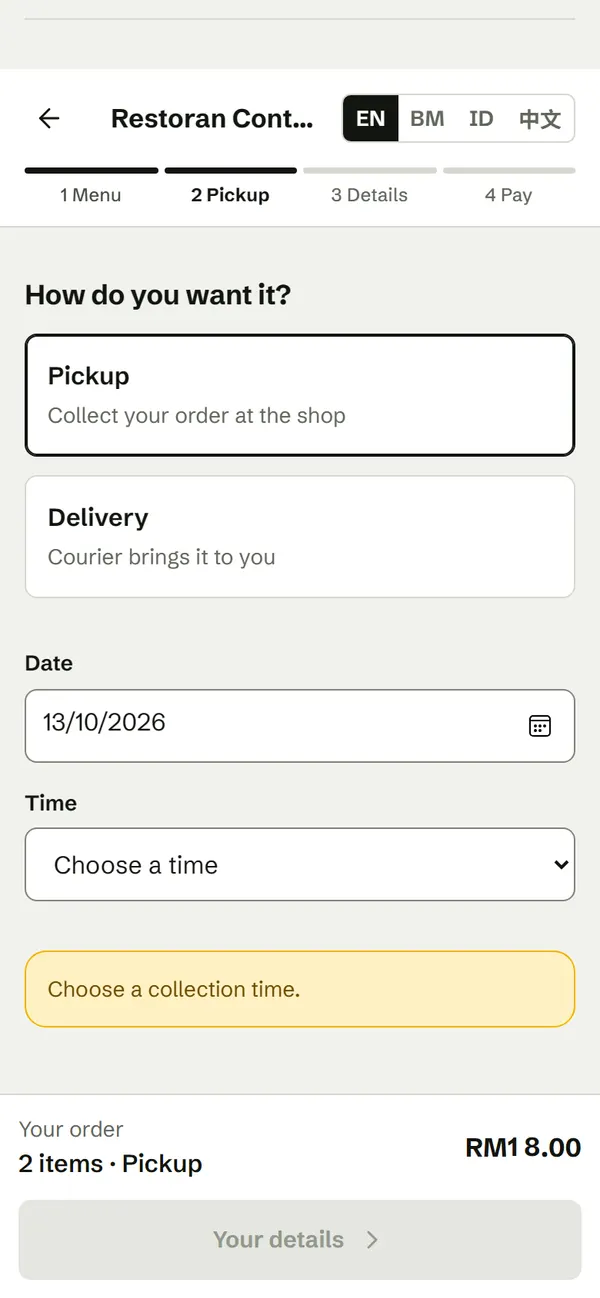
For delivery they pin their address and see the delivery fee before paying. You deliver with your own rider at your per-km price, or use an integrated delivery service where enabled.
- 04
They choose a time
Only times after your preparation time, and with room left in your kitchen, are offered.
- 05
They pay
With FPX online banking, paid into your bank account, or at pickup if you allow it.
- 06
Stock is counted
Each order reserves its quantity. When a batch sells out, the item shows as sold out.
- 07
The order reaches your list
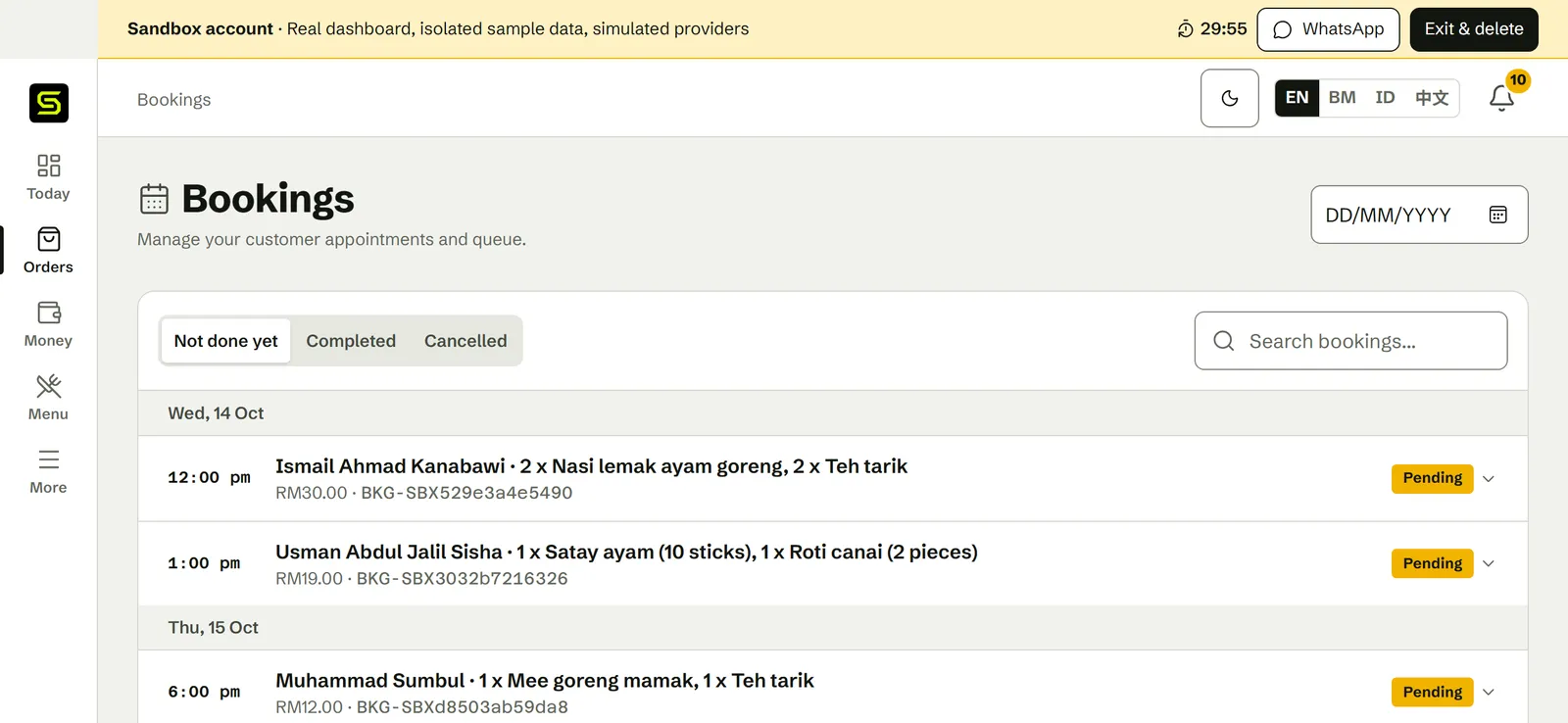
It appears in your dashboard with the items, time and payment. Customers who pay online get a private receipt in WhatsApp.
What it looks like
Real screens from SiniSlot, taken in the sandbox anyone can try at sinislot.shop/sandbox. The sandbox runs a sample business, so the names, prices and bookings below are sample data.
What matters in a food business
Food ordering works differently from appointments. These are the parts that decide whether a busy lunch goes well.
Daily stock
Set how many of each item you made. Orders reserve stock and cancellations release it.
Kitchen capacity
Set how many orders each time slot can take, so the kitchen is never swamped.
Preparation time
Only times after your kitchen notice are offered, up to 24 hours ahead for catering.
Choices that change the price
Size, extra sambal, iced or hot. Each choice carries its own price.
Pickup or delivery
Delivery by your own rider at your per-km price, or an integrated delivery service where enabled. The fee is shown before payment.
Pay online or at pickup
FPX online banking paid into your bank account, or cash when the customer collects.
One list for the kitchen
Every order with its items, time and payment in one dashboard, instead of scattered across chats.
E-Invoice tooling
Tooling to support LHDN MyInvois submission when your business needs it. An order receipt and an E-Invoice are separate things.
Setting up, realistically
You need a menu and your hours before a customer can order. Most sellers finish in one sitting.
- 01Claim your link, for example sinislot.shop/b/your-kitchen.
- 02Add your menu with prices, photos and today’s quantity for each item.
- 03Set your pickup hours, preparation time and how many orders each slot can take.
- 04Turn on delivery if you deliver, with your own rider’s per-km price.
- 05Preview the menu as a customer, then send yourself a test order before sharing it.
- 06Put the link in your WhatsApp Business profile, Instagram bio and WhatsApp Status.
What SiniSlot costs
SiniSlot is free to use, with every feature. You only pay when a customer pays you online, and when you take the money out.
Menu, orders, stock, delivery settings, E-Invoice tools
RM0, unlimited
A RM30.00 order paid online
RM1.75 (SiniSlot RM0.50 + Billplz RM1.25); RM28.25 goes to your balance
Each payout to your bank
RM1.75 (SiniSlot RM0.50 + Billplz RM1.25), however many orders it covers
Orders paid in cash at pickup
RM0
Billplz sets its own fee and may change it. For delivered orders, the customer pays the delivery fee and the courier fee is taken from your balance. Payments always shows the current amounts.
See every feeQuestions food sellers ask
Do my customers need to install an app?
No. They order from your WhatsApp link or open your menu in a browser. There is nothing to download and no account to create.
Can customers pay cash when they collect?
Yes. A food business can let customers pay at pickup. Online payment, when it is used, is always the full order amount with FPX online banking.
Who holds the money when a customer pays online?
SiniSlot collects the payment through Billplz on your behalf and pays it into your bank account once the payment is verified. You add and manage that bank account in Payments.
How do I stop selling more than I cooked?
Set a quantity for each item. Every order reserves its quantity, cancellations release it, and the item shows as sold out at zero, so nobody pays for food that is already gone.
Can I deliver the food?
Yes. Deliver with your own rider at your per-km price, or use an integrated delivery service where it is enabled. The customer pins the address and sees the delivery fee before paying.
Does it take table reservations?
No. SiniSlot takes food orders for pickup or delivery. It does not take dine-in table reservations.
Is an order receipt the same as an LHDN E-Invoice?
No. An order or booking receipt confirms the customer paid. An LHDN E-Invoice is a separate tax document submitted through MyInvois. SiniSlot provides tooling to support that submission, but your business remains the taxpayer responsible for it.
Can I try it before signing up?
Yes. The sandbox opens a temporary food business with sample orders so you can use the real dashboard and the WhatsApp ordering journey. It is deleted when you leave, and no card is involved.
Start free
Every feature from day one, no card required. Share one link, and every order lands in one list.