For service businesses
Take appointments on WhatsApp without the back-and-forth over times
SiniSlot lets a Malaysian service business, such as a spa, clinic, tuition centre, trainer, home service or studio, take appointments from a WhatsApp link. Customers pick a service and a free time, answer your booking questions, and pay with FPX online banking or at the counter. Each time is held while they pay, so nobody takes the same place, and customers get a WhatsApp reminder 30 minutes before.
Built for Malaysian service businesses · Pay online or at the counter · Customers need no new app
By Zukmi Hazamer, founder of SiniSlot Booking · Last reviewed 2026-10-08
What booking appointments by chat costs you
Most service businesses agree times in WhatsApp, one message at a time. That works until the week fills up.
- A customer asks “slot pukul berapa ada?”, and three messages later the time has gone to someone else.
- A group class is promised to more people than the room fits.
- You learn what the customer needs only when they arrive, so the wrong time or tools were set aside.
- Someone books, never pays, never shows, and the slot sits empty.
- Reminders are sent by hand the night before, when you remember.
Work out what an empty slot costs you
Put a number on the appointments lost to no-shows and slow replies. Fill in your own figures.
| Average appointment | RM80 |
|---|---|
| No-shows or missed bookings per week | 3 |
| Lost revenue per week | RM240 |
| Lost revenue per month | RM960 |
| Paid when the customer books | RM80 per appointment |
This is a worked example with sample figures.
How a booking runs
One journey, from the customer’s first tap to a confirmed time in your schedule.
- 01
The customer taps your link
From WhatsApp, your Instagram bio or Google. No app to install, no account to create.
- 02
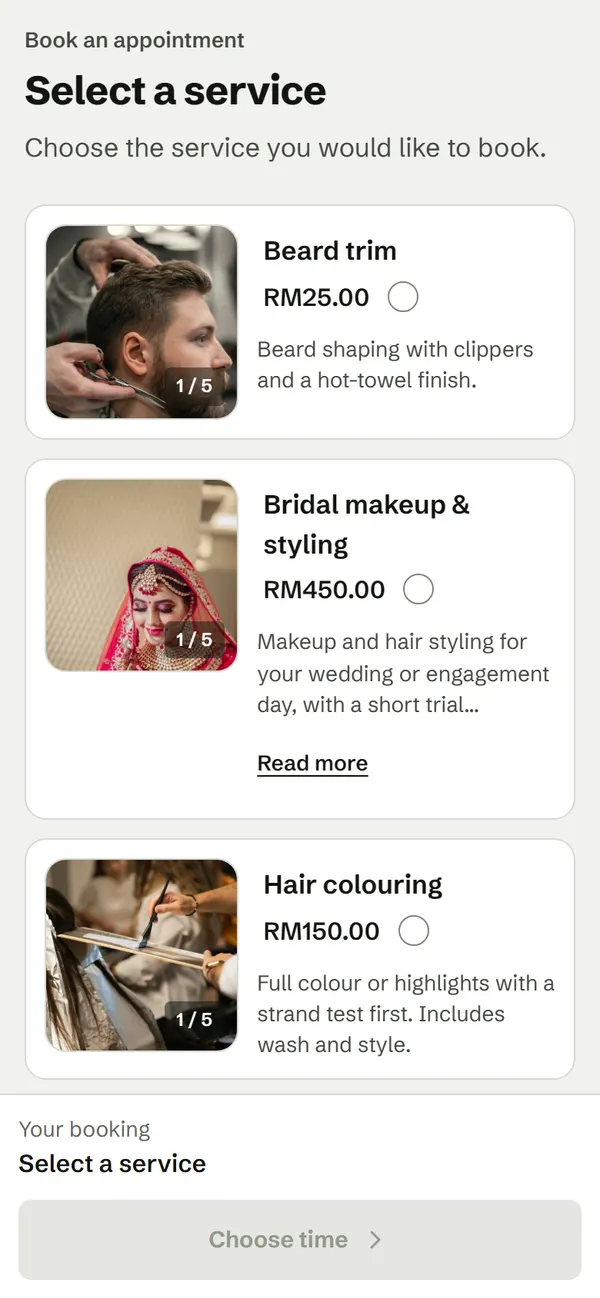
They choose a service
Your list with real prices and lengths, plus choices that change the price, such as a 60 or 90 minute session.
- 03
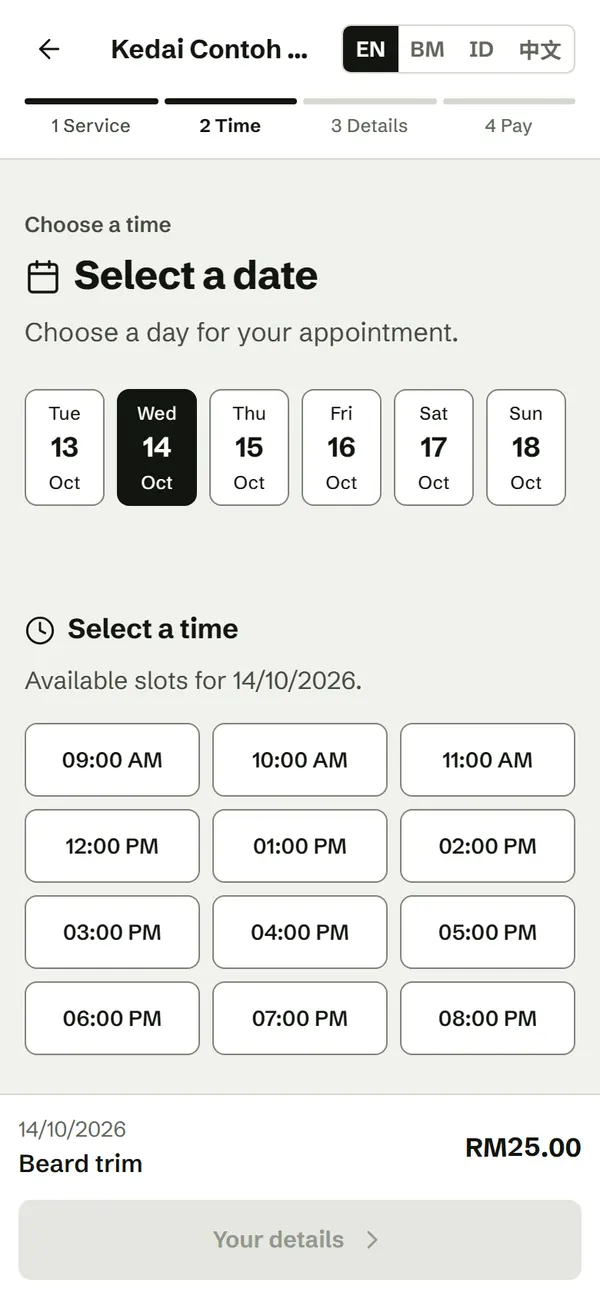
They pick a free time
Only times inside your opening hours, with room left for that service, are offered.
- 04
They answer your questions
Such as the reason for the visit, the student’s year or the address of the job, pinned on a map.
- 05
They pay, if you require it
Full price with FPX online banking, paid into your bank account, or at the counter. The time is held for them while they pay.
- 06
The booking is confirmed
SiniSlot waits for the bank to confirm a payment before the booking is treated as paid, so a failed payment never blocks a time.
- 07
A reminder goes out
The customer gets a WhatsApp reminder 30 minutes before. They agree to it when they book; it is not marketing.
What it looks like
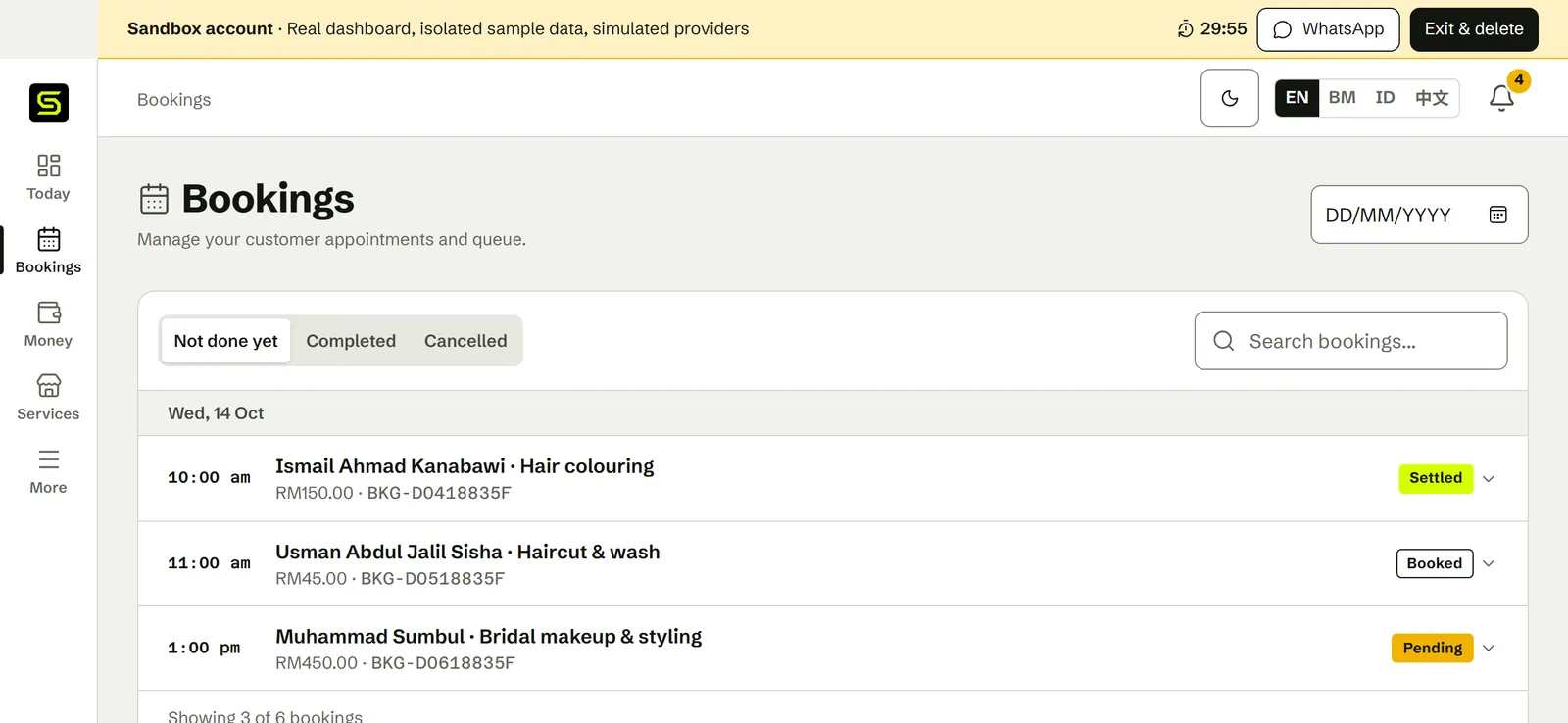
Real screens from SiniSlot, taken in the sandbox anyone can try at sinislot.shop/sandbox. The sandbox runs a sample business, so the names, prices and bookings below are sample data.
What matters for a service business
Every service business sells time. These are the parts that keep a full week running on time.
Length and price for each service
A 30 minute consultation and a 3 hour job take different room in the schedule, and SiniSlot knows it.
How many at once
Set how many customers one time can take: one for a therapist, eight for a group class, three for a cleaning team.
Booking questions
Ask what you need before the customer arrives, including an address pinned on a map for work at their home.
Pay online or at the counter
FPX online banking paid into your bank account, or payment when the service is done, whichever you allow.
A time held while paying
One customer at a time can pay for a place, so two people never take the last one.
WhatsApp reminders
Sent 30 minutes before the appointment, to customers who agreed to them during booking.
Staff accounts
Staff can see and manage the day without reaching your payment settings.
E-Invoice tooling
Tooling to support LHDN MyInvois submission when your business needs it. A booking receipt and an E-Invoice are separate things.
Setting up, realistically
You need your services and hours before a customer can book. Most owners finish in one sitting.
- 01Claim your booking link, for example sinislot.shop/b/your-business.
- 02Add your services with their length, price and any choices.
- 03Set your opening hours, closed dates and how many customers one time can take.
- 04Add booking questions for what you need to know before the appointment.
- 05Preview the page as a customer, then send yourself a test booking before sharing it.
- 06Put the link in your WhatsApp Business profile and Instagram bio, and send it when customers ask for a time.
What SiniSlot costs
SiniSlot is free to use, with every feature. You only pay when a customer pays you online, and when you take the money out.
Bookings, reminders, booking questions, staff accounts, E-Invoice tools
RM0, unlimited
A RM80.00 appointment paid online
RM1.75 (SiniSlot RM0.50 + Billplz RM1.25); RM78.25 goes to your balance
Each payout to your bank
RM1.75 (SiniSlot RM0.50 + Billplz RM1.25), however many bookings it covers
Appointments paid at the counter
RM0
Billplz sets its own fee and may change it. Payments always shows the current amounts.
See every feeQuestions service businesses ask
Do my customers need to install an app?
No. They book from your WhatsApp link or open your booking page in a browser. There is nothing to download and no account to create.
Can I take bookings without asking for payment?
Yes. Online payment is optional. Customers can pay at the counter, and when online payment is on they pay the full price when they book.
Who holds the money when a customer pays online?
SiniSlot collects the payment through Billplz on your behalf and pays it into your bank account once the payment is verified. You add and manage that bank account in Payments.
Can I run group classes?
Yes. Set how many people one time can take. The class stops taking bookings when it is full.
Can I go to the customer’s home?
Yes. Add an address question, and customers pin their home on a map when they book. Set how many jobs your team can take at the same time.
When are reminders sent?
A WhatsApp reminder goes out 30 minutes before the appointment to customers who agreed to reminders when they booked.
Is a booking receipt the same as an LHDN E-Invoice?
No. A booking receipt confirms the customer paid. An LHDN E-Invoice is a separate tax document submitted through MyInvois. SiniSlot provides tooling to support that submission, but your business remains the taxpayer responsible for it.
Can I try it before signing up?
Yes. The sandbox opens a temporary account with sample bookings so you can use the real dashboard and the WhatsApp booking journey. It is deleted when you leave, and no card is involved.
Start free
Every feature from day one, no card required. Send one link when customers ask for a time, and let the schedule answer.